
Alibaba · Tongyi Lab
Wan 3.0: 30-second AI video in one pass, with its own sound
Wan 3.0 is Alibaba's all-in-one AI video generator. It turns a prompt, an image or a set of references into any length from 2 to 30 seconds in a single request, at up to 1080p and 30 fps, and renders dialogue, music and sound effects in the same job. On Popcraft it starts at 11 credits a second.
In the video studio, Canvas boards and the MCP connector
- 2–30 s
- any whole second, one pass
- 1080p 30 fps
- 480p and 720p tiers too
- 4 · 5 · 5 refs
- images, clips, audio
- 11 cr / s
- at 480p — 330 for 30 s
Native 30s duration
Alibaba's first headline feature: "more complete storytelling and creative freedom" from a native 30-second pass. The hero film above at six points along its timeline, and what the clock and the file said about the clips we generated for this page.
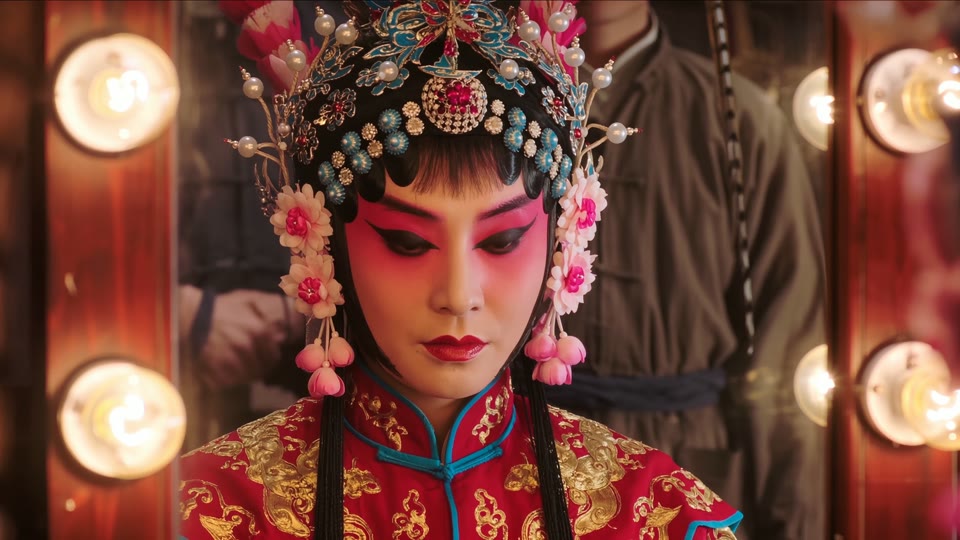 1s
1s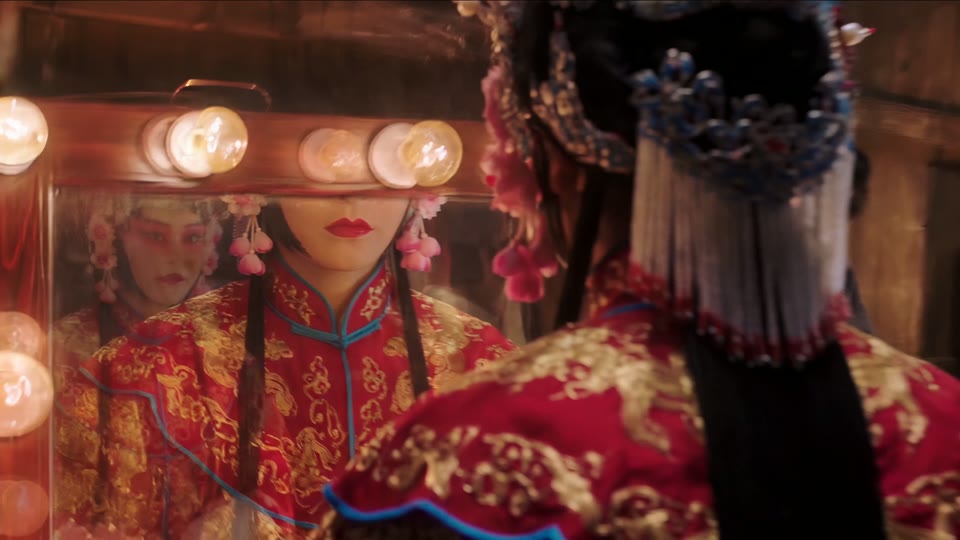 6s
6s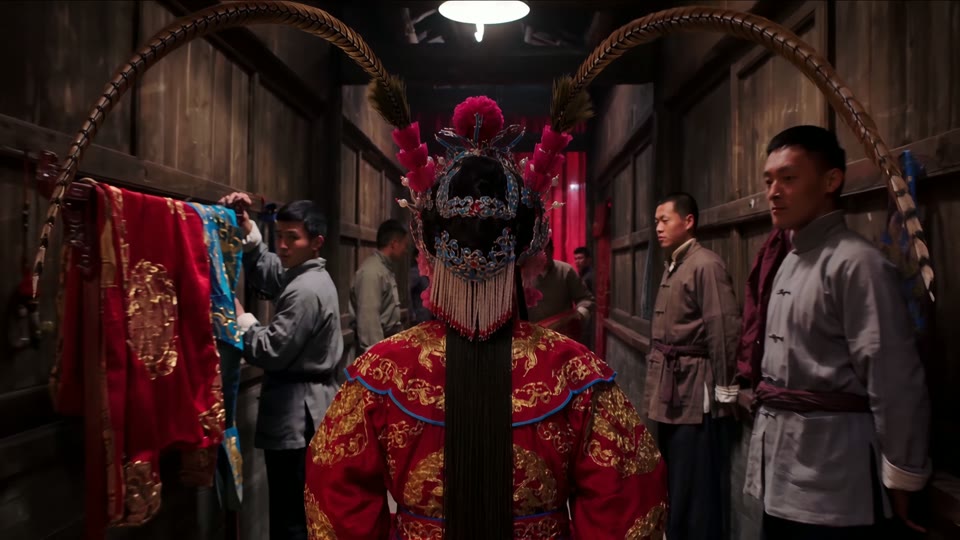 12s
12s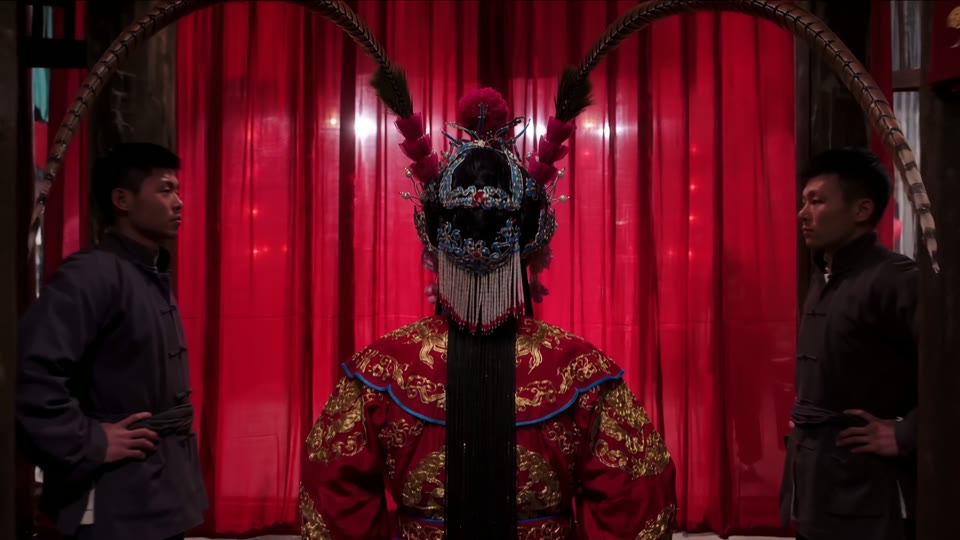 18s
18s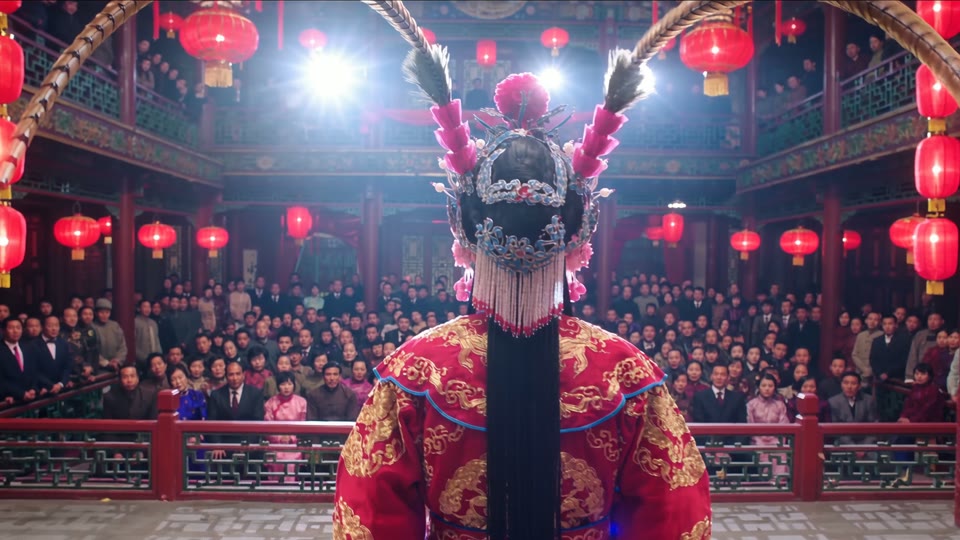 24s
24s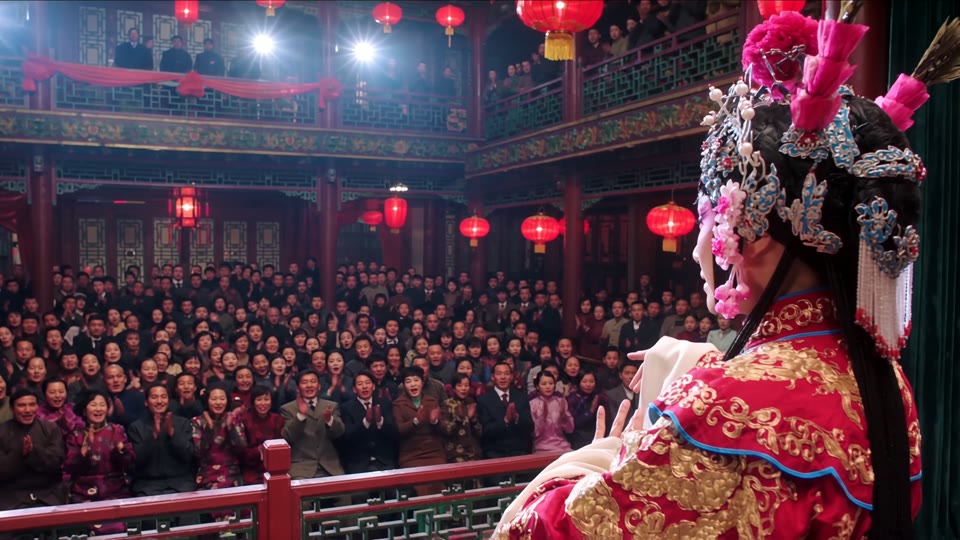 29s
29s| Request | Delivered | Wall time |
|---|---|---|
| 30 s · 1080p · text only | 30.02 s · 1920×1080 · stereo | 5 min 38 s |
| 5 s · 720p · text only | 5.04 s · 1280×720 · stereo | 1 min 37 s |
| 3 s and 10 s · from a 6 s reference clip | 3.02 s and 10.03 s · the clip set the motion, not the length | ≈ 1 min 25 s each |
Wall time is submit-to-file on Popcraft, September 2026. Every clip landed within a few hundredths of a second of the request, so the credits you see before generating are the credits you spend.
Immersive experience: realism, texture and sound design
Alibaba's words: "elevated realism, texture, and sound design". Three films, three looks — live action, feature-style CG, brand fantasy — each one request, one continuous take, 30 seconds, with the soundtrack generated in the same pass. Only the prompt changed.
Curtain
The hero film above: a Beijing-opera performer from the dressing-room mirror, down the backstage corridor, through the velvet curtain into a lantern-lit full house. Drums build, a gong strikes, the house roars.
Fox spirit
A nine-tailed fox sprints across lantern-lit rooftops, leaps a gap as lanterns scatter, hangs against the full moon and lands on the bell tower as the city's lanterns rise. Painterly 3D look from a text prompt alone.
Vending machine
A girl in a yellow raincoat presses a button in a rainy alley and is pulled through the glass into a pop-coloured world where a mascot hands her a can. Fizz becomes fireworks, and the camera pulls back out to the alley.
Every film here is shown as delivered: no edit, no added music. Drafts at 480p are 330 credits each; 1080p is 1,200.
What is Wan 3.0?
Wan 3.0 (万相 3.0) is the video model from Alibaba's Tongyi Lab, in public beta since 6 August 2026 and launched on 24 August. Alibaba calls it an all-in-one reference video model: one model for text-to-video, image-to-video, first-and-last-frame control and generation from mixed references, instead of a separate model per task. It is API-only — there are no open weights — and Popcraft runs the prime edition, the faster of the two Alibaba offers.
Alibaba Cloud Model Studio guide and API reference for wan3.0-video; the official Wan 3.0 repository README; Alibaba's developer-community launch summary. Claims above are Alibaba's; measurements on this page are ours.
“Stably generates up to 30 seconds of video per request, at 30 frames per second.”
Length
“Natively outputs dialogue, background music and sound effects — no post-production dubbing.”
Sound
“Consistency of character appearance, clothing, props, environment and visual style; push, pull, pan and tracking camera moves.”
Consistency and camera
- Native 30s Duration“More complete storytelling and creative freedom.”On Popcraft: any length from 2 to 30 seconds, one pass.
- Omni-Creation“Up to 20 reference assets, with document and webpage parsing.”On Popcraft: 4 images, 5 clips, 5 audio. Documents and web pages not yet.
- Pixel-Perfect Consistency“Improve delivery certainty for production workflows.”On Popcraft: yes — see the stills below.
- Immersive Experience“Elevated realism, texture, and sound design.”On Popcraft: yes — dialogue, music and effects generated with the picture.
- Precision Video Editing“More controllable editing to boost creative efficiency.”Not on Popcraft yet — use Seedance 2.5 or Gemini Omni to edit or extend.
Omni-Creation: images, clips and audio in one prompt
Alibaba's second headline feature — generate from multimodal input. On Popcraft that is up to 4 images, 5 video clips and 5 audio clips on a single request, each named in the prompt as Image 1, Video 1 or Audio 1 in the order attached. Alibaba's platform also parses documents and web pages; that part is not on Popcraft yet.
Subjects, products and sets
A character sheet locks a face and wardrobe; a product photo locks the object; a location still locks the set. The model keeps what is in the picture, so describe departures explicitly. Two images with "first frame" and "last frame" in the prompt become keyframes instead.
JPEG, PNG, WEBP or BMP · 240 to 8,000 px a side · 20 MB each
The woman from Image 1 walks along Image 2's street at dusk, camera tracking beside her. Keep her hair, coat and bag exactly as in Image 1.
Motion, camera and performance
A clip carries its camera path, blocking and performance into the new shot. Pair it with an image and the image's subject performs the clip's move on the clip's set. The clip sets the motion, not the length — the slider does that.
MP4 or MOV · 1 to 15 s each and 15 s in total · 100 MB each
The man from Image 1 stands between the pillars. Follow the camera movement of Video 1 exactly: a low wide angle orbiting right into a three-quarter close-up.
A voice's timbre or a track's beat
Alibaba's recipe: the audio carries the voice or the rhythm, and the spoken line goes in the prompt; the model generates the speech and the mouth movement together. It is not a mouth-this-recording tool — for that, use an avatar model such as OmniHuman.
WAV or MP3 · 1 to 15 s each and 15 s in total · 15 MB each
Take the timbre of Audio 1 and have the character say: "Really? That sounds great — when are you back?" The generated speech drives natural mouth movement.
Keyframes and references do not mix. Two images marked first and last frame make a keyframe clip on their own; everything else — subject images, clips, audio — combines freely up to the limits above.
Pixel-perfect consistency
Alibaba's third headline feature: "improve delivery certainty for production workflows" — the model card puts it as preserving character and reference details across frames. The same performer from the hero film at three points, 28 seconds apart.
1 s12 s29 sHow to prompt Wan 3.0
The model plans the whole clip from the prompt, so the prompt has to say what kind of clip it is. Our renders held whenever we named the continuity — one unbroken shot, or a numbered list of shots. The rest follows from that.
Say "no cuts", then time the beats
Open with "one continuous take, no cuts, no transitions", give each stretch of seconds one thing to do and one camera verb, keep a single lead subject in frame, and write the sound as its own sentence. The hero film was written exactly like this and came back without a single cut.
ONE CONTINUOUS TAKE, NO CUTS, NO TRANSITIONS, 30 s. Cinematic photoreal, high contrast. A Beijing-opera performer in painted-face makeup and a crimson-and-gold robe.
0–6 s: extreme close-up in a dressing-room mirror ringed with bulbs; she opens her eyes.
6–16 s: she walks down a narrow backstage corridor, stagehands flattening against the walls, the camera tracking backwards ahead of her as drums build.
16–24 s: she pushes through heavy red velvet curtains into blinding stage light; the camera swings behind her shoulder.
24–30 s: the reveal — a packed theatre under red lanterns; she raises one water-sleeve as a gong strikes.
Sound: drums building, footsteps, the curtain rush, one gong, applause. No dialogue, no on-screen text.
- Name the references
- Image 1, Video 1, Audio 1 — numbered per type in attach order — and say what each is for: "Image 1 is the character; Video 1 is the camera move".
- Direct the sound
- By default the model writes dialogue, music and effects. Ask for what you want — "rain and a distant tram, no dialogue" — or turn the Audio switch off for a silent file.
- Faithful beats bold
- Given an image, the model keeps what is in it. For a big departure — weather, wardrobe, a different set — describe the change explicitly rather than expecting the prompt to overrule the picture.
- Keep it to one lead
- A single figure, a named camera path and the words "no cuts" gave us a clean take every time. Crowds, hands and small props are where any video model, this one included, gets soft.
- Draft cheap, deliver dear
- 480p is the same model at a quarter of the 1080p price. Prove the story at 480p, then re-render the winner at 1080p with the same prompt and references.
Wan 3.0 vs Seedance 2.5 vs Gemini Omni 1.1 Flash
Three models on Popcraft that all generate sound with the picture. Wan's edge is the cheapest 30-second take on the platform and a subject that stays faithful to its reference; Seedance's is reference count, editing and extension; Omni's is 4K and 40 seconds by extension. Pick by the job.
| Capability | Wan 3.0 | Seedance 2.5 | Gemini Omni 1.1 Flash |
|---|---|---|---|
| Longest clip from one request | 30 s in one pass | 30 s | 40 s by scene extension (30 s at 4K) |
| Resolutions | 480p / 720p / 1080p at 30 fps | Up to 1080p | 360p draft to 4K |
| Native audio | Dialogue, music, effects; switchable off | Yes | Speech, music, sound effects |
| Reference images | Up to 4 | Up to 30 | Up to 10 |
| Reference videos | Up to 5, 15 s in total | Up to 10 | Up to 3 |
| Reference audio | Up to 5, 15 s in total | Up to 10 | — |
| Edit or extend a clip | — (use Seedance 2.5 or Omni) | Edit; extend before or after | Edit; extend in 10 s legs |
| A 30-second draft | 330 credits at 480p | Per second, by resolution | 150 credits at 360p |
Wan figures are from Alibaba's Model Studio guide; the Popcraft limits are what the picker exposes today. Provider ceilings change; the picker always shows what is currently available. Full comparisons: Seedance 2.5 · Gemini Omni 1.1 Flash.
Wan 3.0 pricing on Popcraft
Billed per second delivered, by resolution. References are free to attach. Because the delivered length matches the request, the price shown before you generate is the price you pay.
Every plan includes credits; the pricing page lists current rates for all models. Free-tier downloads carry a visible Popcraft watermark, which paid plans remove.
What Alibaba lists Wan 3.0 for
The three scenarios in Alibaba's own launch material, and how to run them on Popcraft.
- 01
Short-video content: plot dramatisation and ad teasers
Alibaba's entertainment scenario. Up to 30 seconds of multi-shot narrative from one prompt, sound included.
- 02
E-commerce: product showcase from a product image
Alibaba's e-commerce scenario — "upload a product image plus a description, get a dynamic showcase". Attach the photo as Image 1.
- 03
Education: staged scenario simulations
Alibaba's education scenario — a doctor's consultation or a support call staged from a prompt, with the dialogue generated.
- 04
Draft at 480p, deliver at 1080p
The Popcraft addition: 11 credits a second at 480p makes a 30-second draft 330 credits before you commit to 1080p.
Wan 3.0 — frequently asked questions
Alibaba's all-in-one video model from Tongyi Lab, in public beta since 6 August 2026 and launched on 24 August. One model covers text-to-video, image-to-video, first-and-last-frame control and multi-reference generation, produces any length from 2 to 30 seconds in a single pass at 30 fps, and generates dialogue, background music and sound effects with the picture.
Any whole second from 2 to 30, in one pass — no extension chain, no stitching. On Popcraft you set the length on one slider and the delivered file matches the request; in our own tests every clip came back within a few hundredths of a second of the length we asked for, and you pay for exactly those seconds.
By default yes. Alibaba's guide says the model "natively outputs dialogue, BGM and sound effects" and lets you specify lines and sounds in the prompt. The Audio switch on Popcraft turns it off, and a clip generated with it off has no audio track at all.
Attach up to 4 images, 5 video clips and 5 audio clips and refer to them in the prompt as Image 1, Video 1, Audio 1 and so on, numbered per type in the order you attached them. Images carry a character, object or scene; a video carries motion and camera; audio carries a voice or a beat. Videos are capped at 15 seconds in total and so is audio. Two images with "first frame" and "last frame" in the prompt become keyframes instead, and keyframes cannot be mixed with other references.
That is what the model is built for. Alibaba lists consistency of character appearance, wardrobe, props and environment as a headline capability, and in our own tests a character sheet held its identity through a reference clip's camera move, a square product image was reproduced faithfully inside a 16:9 frame, and a single figure held across a 30-second take. Wan 3.0 sides with the image you give it — for big creative departures from a reference, describe them explicitly.
Not on Popcraft today. Wan 3.0 uses an attached clip as a reference for motion, camera and subject; for extending or editing footage, use Seedance 2.5 or Gemini Omni 1.1 Flash, which both have an Extend Video panel.
Alibaba describes audio references as carrying a voice's timbre and a track's beat, with the spoken line written in the prompt; the model then generates the speech and the mouth movement together. It is not a mouth-this-recording tool. For a talking-head clip driven by a specific recording, use an avatar model such as OmniHuman.
Wan 3.0 is billed per second delivered: 11 credits at 480p, 20 at 720p and 40 at 1080p. A 30-second draft at 480p is 330 credits; the same clip at 1080p is 1,200. Every length and resolution shows its price before you generate, and free-tier downloads carry a visible Popcraft watermark, which paid plans remove.
Thirty seconds, one request. Try it at 480p first.
Draft it for 330 credits, judge the story, then render the winner at 1080p — or bring a character sheet and a clip and let them meet.
From the forum
News and guides
Keep exploring
Related models
Seedance 2.5 generates up to 30 seconds of video in a single job, with up to 50 reference assets, controllable video editing, high-fidelity temporal extension, any aspect ratio from 0.4 to 2.5, and native prompting in 10+ languages. Live on Popcraft.
Gemini Omni 1.1 Flash is Google's video model that creates and edits video from any input. Up to 40 seconds by scene extension, 1080p and 4K output, first-and-last-frame interpolation, up to 10 reference images, and speech, music and sound effects generated with the picture. Live on Popcraft.
MiniMax H3 generates 2K video at 24fps with a synchronised stereo soundtrack — effects, ambience and dialogue in one job. Multi-shot from a single prompt, 5 to 15 seconds, first and last frame control. Live on Popcraft.
Generate cinematic 4K video from text, images, or clips with Seedance 2.0 on Popcraft. Native synced audio, multi-shot sequences, and razor-sharp detail at up to 4K (2160p).