Popcraft brings together advanced AI creative tools in a single platform. Whether you're making images, videos, audio, avatars, or complete multi-scene productions, there's a tool built for the job — and because they all live in one place, the output of one becomes the input of the next. Here's everything you need to know, and how to decide which tool fits your project.
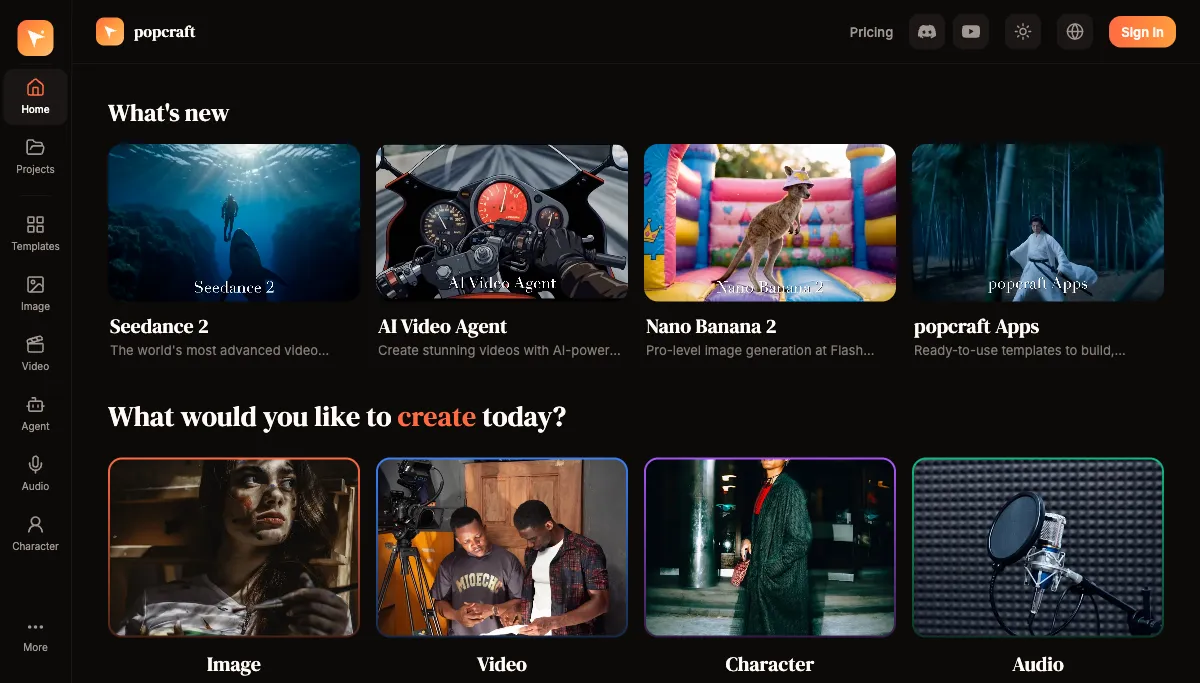
You can try all of this for free: Popcraft starts you with 100 credits and no credit card required, and commercial use is allowed from the start. Paid plans add more credits and higher limits as you scale.
What can you create with the image generator?
Route: /image
The image generator offers several AI models, each tuned for a different priority. Choosing well is mostly about trading speed for fidelity:
Nano Banana 2 — The fast option with excellent quality. It's the go-to for rapid iteration, social content, and exploring ideas, where getting ten options quickly matters more than squeezing out the last detail.
Nano Banana Pro — Enhanced quality with more creative control, for when a piece needs that extra level of detail and refinement.
Seedream — High-fidelity outputs with exceptional detail. The right choice for professional marketing materials, product imagery, and anything destined for large-format or print.
Key image features
- Reference images — guide style or composition from an existing image
- Multiple aspect ratios — from square social posts to wide banners
- Batch generation — create variations efficiently in one pass
- Upscaling — raise resolution for print or large displays
A simple rule of thumb: start on Nano Banana 2 to explore, then re-run your favorite direction on a higher-fidelity model for the final asset.
What can you create with the video generator?
Route: /video
The video generator is powered by cutting-edge models:
Seedance 2.0 — Next-generation video with strong temporal coherence, motion quality, and visual fidelity. A good default when you want a clip that holds together convincingly across its full length.
Veo 3.1 — Multi-reference support for more complex generations where you need precise control over several elements at once.
Key video features
- Text-to-video — generate a clip from a written description
- Reference-to-video — turn a still image into motion
- Motion sync — control motion patterns and camera movement
- Lip sync — audio-driven facial animation
- Video extension — lengthen an existing clip
If you've already made an image you love, reference-to-video is the most natural next step: it animates the exact asset you have rather than generating something new from scratch.
What's in the Character hub?
Route: /character
The Character hub is a full character and avatar system, covering most of the cases where a person or persona needs to appear on screen:
- Talking Video — AI avatar lip-sync videos from text or audio. OmniHuman 1.5 produces high-quality results up to about 30 seconds; Kling Avatar supports longer clips up to roughly 60 seconds.
- Headshot — professional AI portrait generation
- Photo to Character — convert a photo into a stylized character
- Virtual Try-On — visualize products on a model
- Reaction Pack — generate a set of character expressions
- Dance — create character dance animations
- Face Swap — swap faces in images or video
For a spokesperson or explainer video, Talking Video is usually the starting point: bring a clear, front-facing face image and a script, and you get a lip-synced clip without filming anything.
What can the audio tools do?
Route: /audio
AI audio covers the full soundtrack of a video in one place, powered by ElevenLabs:
- Text-to-Speech (TTS) — natural voiceover from text, with control over emotion and speed
- Background Music (BGM) — custom, royalty-free music generation
- Sound Effects (SFX) — any sound effect from a text description
- Voice Cloning — create a custom voice from audio samples for consistent narration across a series
Because audio sits alongside the video tools, a voiceover you generate here drops straight into a timeline rather than bouncing through a separate editor.
What is Canvas?
Route: /canvas
Canvas is an infinite, node-graph workspace where you wire generations together on a single board instead of hopping between tools. Drop in a prompt, branch variations, feed a generated image into a video, and lay a whole project out visually — each saved board keeps the full graph, so you can come back and remix it later.
What does the AI Video Agent do?
Route: /agent
The AI Video Agent is the most ambitious feature — a fully automated video production pipeline that takes a single brief and runs it end to end:
- Brief — describe your video concept
- Script — the AI writes the full script
- Elements — visual elements are generated
- Start Frames — key frames establish the visual direction
- Video — full clips are rendered
- Audio — voiceover, music, and effects are created
- Timeline — everything is assembled into a finished video
Along the way the agent makes creative decisions, selects appropriate models for each step, and iterates on quality — turning one text brief into a complete multi-scene video. It's the right tool when you want a finished result rather than a set of raw assets to assemble yourself.
When should you use Apps and Templates?
Route: /templates
Templates are ready-to-use workflows for common content needs — the fastest path when your project fits a familiar shape:
- TikTok Ad Creator — social ads structured for engagement
- Product Video Generator — turn product photos into video ads
- Template Collections — curated templates for different industries and use cases
Reach for a template when you want proven structure and speed; reach for the individual tools above when you want full control over every element.
What supporting features tie it together?
- Projects (/projects): organize work by campaign, client, or project, with collaboration; every output is filed in its project, so any result is one click from becoming the next input
- Inspiration (/inspire) — browse community creations for ideas and techniques
Where should a new user start?
New to Popcraft? Here's a recommended path that builds from simple to ambitious:
- Start with image generation. Try Nano Banana 2 with a simple prompt to get a feel for it.
- Explore video. Use reference-to-video to animate one of your generated images.
- Try audio. Generate a voiceover or a background music track.
- Use a template. Run one that matches your specific use case end to end.
- Go advanced. Hand a brief to the AI Video Agent and let it produce a full video.
The throughline across all of it: each tool feeds the next. An image becomes a video reference. A video gets an AI voiceover. A script becomes a spoken avatar. Everything flows together in one connected creative ecosystem, which is what makes producing a finished piece — not just a single asset — fast enough to do on a regular schedule.