The most productive creators don't just use AI tools — they build systems around them. A single great image is luck; a workflow that produces great images on schedule is a competitive advantage. A well-designed AI content workflow multiplies your output while maintaining — or even improving — quality. Here's how to build yours.
What does a four-phase AI content workflow look like?
Think of your workflow as a loop, not a line. Four phases — strategy, asset creation, assembly, and publish/analyze — feed into each other, and the insights from the last phase shape the first phase of the next cycle.
Phase 1: Strategy and planning
Time: 1-2 hours per week
Start with intention, not tools. The temptation with AI is to jump straight to generating, but a batch of beautiful assets that don't ladder up to a goal is just expensive noise. Before generating anything:
- Define your content pillars. Pick 3-5 recurring themes that align with your brand and resonate with your audience. Every piece you make should fit one of them.
- Set weekly goals. How many pieces per platform? What mix of formats — image, video, short-form, long-form?
- Identify key messages. For each piece, what do you want the audience to know, feel, or do?
- Plan the calendar. Map the week to specific content types and topics so the rest of the workflow is execution, not deliberation.
AI can assist this phase too. Use it to generate ideas within your pillars, draft a content brief for each piece, or spin fresh variations of content that performed well in the past.
Phase 2: Asset creation
Time: 2-3 hours per week, in batches
This is where AI shines, and where batching pays off most. Generating a week of assets in one focused session reuses your setup, your prompts, and your creative context — it's far faster than making one piece at a time across the week. This is the single biggest efficiency gain in the whole workflow.
Images. Use an image generator to produce product photos and lifestyle imagery, social graphics and thumbnails, and A/B variations. Build a library of brand-consistent visuals you can draw on later. A fast model like Nano Banana 2 suits rapid iteration; a higher-fidelity model is worth the extra time for hero marketing images.
Video. With a video generator, create product showcase clips from photos, short-form content for social, and reference-to-video versions that bring static assets to life. For talking-head announcements, the Character hub turns a face image and a script into a lip-synced avatar video.
Audio. Generate voiceovers, mood-specific background music, and sound effects with AI audio, or clone a voice for consistent narration across a series.
The key is to generate with the next phase in mind. A product photo is also a video reference. A script is also a voiceover source. Producing assets that hand off cleanly is what turns a pile of files into a pipeline.
Phase 3: Assembly and polish
Time: 1-2 hours per week
Now combine the raw assets into finished content:
- Review and select. Choose the strongest outputs from your batch and discard the rest without sentimentality.
- Combine elements. Layer video, audio, text, and graphics — a multi-track timeline lets you stack a voiceover, a music bed, and on-screen captions over your footage.
- Add human touches. Personal captions, brand-specific adjustments, the small details AI won't think to add.
- Quality check. Watch and listen end to end before anything ships.
- Format for platforms. Adjust dimensions, lengths, and formats so each piece fits where it's going.
If assembly is where you spend the most time, lean on templates — they encode the structural decisions so you focus on selection and polish rather than rebuilding layouts.
Phase 4: Publish and analyze
Time: about 1 hour per week
- Schedule content across your platforms.
- Monitor performance in the first 24-48 hours, when most signal arrives.
- Engage with comments, shares, and questions.
- Log insights. What worked? What didn't? Why do you think so?
- Feed it back into next week's planning.
This last step is what makes the whole thing a system rather than a treadmill. Skip it and you'll keep producing volume without getting better.
How should your tools connect?
The best workflows link your AI tools into a single seamless pipeline:
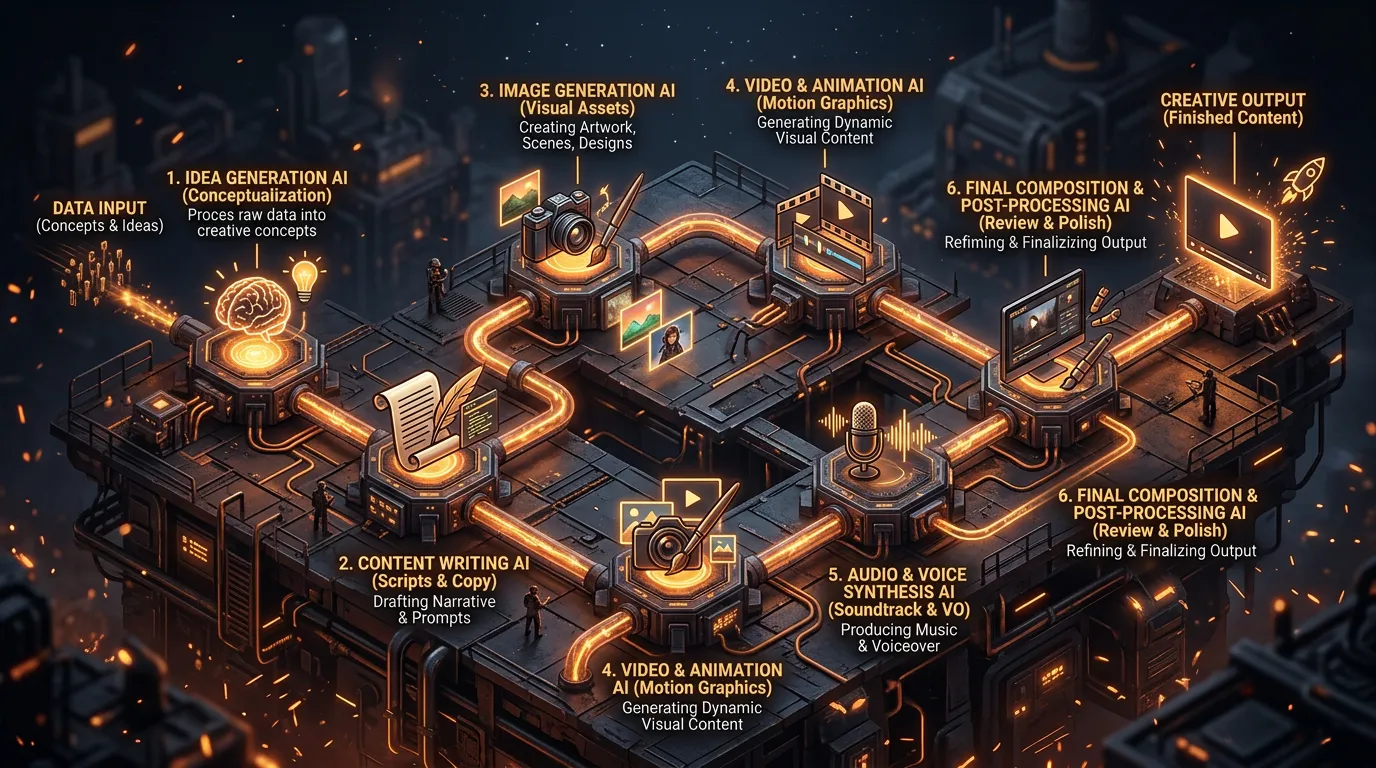
Input → AI generation → review → assembly → output
Each step should flow naturally into the next:
- Product photos feed both image enhancement and video generation
- Scripts feed both voiceover generation and avatar content
- Generated music feeds video editing
- Finished content feeds your scheduling tools
When tools share one platform — and one assets library you can pull from across them — those hand-offs happen without exporting, re-uploading, and reformatting between steps. For the most automated version of this, an AI Video Agent runs the entire chain (Brief → Script → Elements → Start Frames → Video → Audio → Timeline) from a single brief, then hands you a finished video to review.
Which tool fits which content type?
Part of a smooth workflow is knowing, before you start a batch, which tool each piece needs — so you're not deciding mid-stream. A rough map:
- A product still for a listing or a social post → start in the image generator, refine on a higher-fidelity model for the hero shot.
- A short clip from an existing image → reference-to-video in the video generator. It animates the asset you already approved, which keeps the look consistent.
- A spokesperson or explainer with a talking face → the Character hub's Talking Video, fed a clear front-facing image and a script.
- A voiceover, music bed, or sound effect → the audio tools, generated to drop straight into your timeline.
- A recurring, proven format → a template, so the structure is already decided.
- A finished multi-scene video from a single idea → hand the brief to the AI Video Agent and review what it produces.
Matching the tool to the job up front is a small habit that compounds: it removes the most common source of mid-batch friction, where you stop to figure out how to make something instead of just making it.
How do you measure whether your workflow is working?
Track a handful of metrics so you're optimizing the process, not just the individual posts:
- Time per piece — from concept to publish. If this isn't falling over time, your workflow isn't compounding.
- Output volume — pieces per week across all platforms.
- Quality consistency — is output holding up as volume rises, or slipping?
- Engagement — are AI-assisted pieces performing as well as your hand-made ones?
- Cost per piece — total cost, tools plus time, per published piece.
Common workflow mistakes
- No batching. Creating one piece at a time wastes setup and context every single time.
- Over-generating. Spinning up 100 variations when you need 5 burns credits and review time. Generate with intent.
- Skipping review. Publishing without a quality check is the fastest way to erode brand trust.
- Ignoring analytics. Without data from Phase 4, you can't improve Phase 1.
- No templates. Rebuilding from scratch every time throws away AI's biggest advantage — speed at scale.
Get all four phases turning and the result isn't just more content. It's a content engine that runs on a few hours a week, learns from its own results, and keeps getting more efficient as you feed insights back into the top of the loop.