Professional voiceover used to require booking studio time, hiring voice talent, and managing multiple recording sessions. AI voice technology has changed this entirely — you can now create natural-sounding voiceovers, music, and sound effects in minutes, all from a single browser tab. This guide walks through what's actually possible today, how to use each capability well, and how to assemble the pieces into finished audio.
What Can AI Voice Tools Create in 2026?
Modern text-to-speech has come remarkably far. The AI audio workspace in Popcraft is powered by ElevenLabs, and today's AI voices feature:
- Natural intonation that adapts to context and emotion rather than reading flatly
- Multiple languages with native-quality pronunciation from a single text input
- Voice cloning to create a custom voice from a short audio sample
- Emotion control to match the tone of your content — warm, urgent, calm, excited
- Speed adjustment so a 30-second slot and a 60-second slot can use the same script at different paces
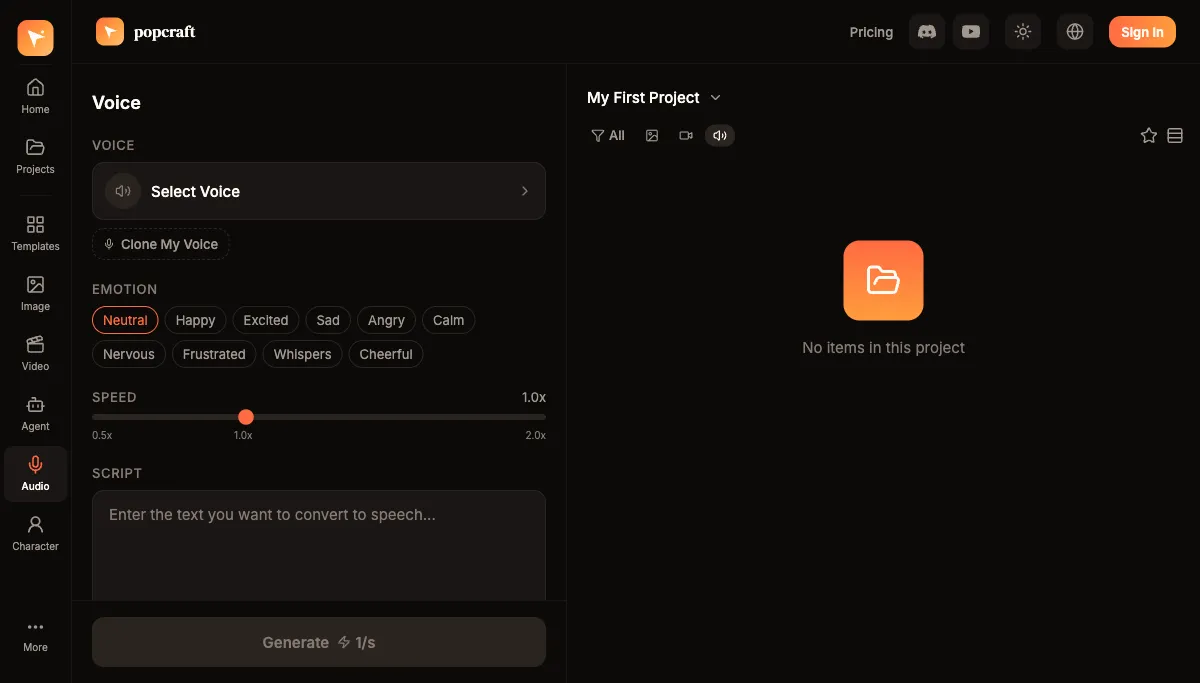
Everything below is available on the free tier — you start with 100 credits and no card, and what you generate is cleared for commercial use, so test runs aren't wasted.
What Are the Three Types of AI Audio?
Text-to-Speech (TTS)
Text-to-speech converts any written script into natural-sounding speech. You choose a voice from the library or use one you've cloned, set the emotion and speed, and generate. TTS is the workhorse for:
- Video narration and voiceover
- Podcast episodes and long-form audio
- Product demos and step-by-step tutorials
- Audiobook and e-learning narration
The two settings that change a result the most are emotion and speed. A product explainer usually wants a steady, neutral-to-warm read; a launch teaser wants more energy and a slightly faster pace. Generate a short test line first — one or two sentences — and lock those two settings before you run the full script. That habit alone saves the most credits.
Background Music (BGM)
AI music generates royalty-free background tracks tailored to your content's mood and genre. There are no licensing fees and no copyright conflicts, because every track is unique to your project. You describe the music in plain language and specify genre, mood, tempo, instruments, and duration — generating to a target length is what lets the music and the video line up cleanly later.
Sound Effects (SFX)
Sound effects are created from text descriptions. Need "gentle rain on a tin roof" or "busy cafe ambiance with distant espresso machine"? Describe it and the AI generates it. The more specific the material and environment, the closer the result.
How Do You Actually Build a Project? Three Workflows
The capabilities are simple on their own; the value is in combining them. Here are the three most common flows.
For video projects:
- Write your script, reading it aloud once to catch tongue-twisters
- Select a voice that matches your brand and generate a short test line
- Lock in speed and emotion, then generate the full voiceover
- Generate background music to the same duration as your edit
- Add sound effects on key actions and transitions
- Sync everything in the multi-track timeline so VO, music, and SFX sit on separate tracks
For podcasts:
- Write or outline the episode and mark speaker turns
- Generate voice segments — a different voice per speaker keeps roles distinct
- Add an intro and outro music bed
- Insert sound effects and transitions between segments
- Export in a podcast-ready format
For marketing:
- Write tight ad copy — every word earns its place in a 15- to 30-second spot
- Choose an energetic, trustworthy voice
- Generate two or three takes at different emotion settings and pick the strongest
- Layer upbeat music underneath, mixed lower than the voice
- Export for social or broadcast
What Is Voice Cloning, and When Should You Use It?
One of the most useful features is voice cloning. You upload a short audio sample — around 30 seconds is enough — and the model creates a reusable digital version of that voice. Once cloned, that voice works like any other library voice across new scripts. This unlocks three things:
- Brand consistency — the same voice carries across every piece of content, so your channel sounds like one voice rather than a rotating cast
- Scalability — you generate unlimited narration without re-booking the original speaker for each session
- Multilingual reach — the cloned voice can deliver scripts in languages the original speaker doesn't speak, which makes localization far simpler
A practical note: clone from your cleanest available sample. Background noise, room echo, or clipping in the 30-second source carries into every line you generate afterward, so a quiet, evenly-recorded clip pays off many times over.
TTS vs. Voice Cloning vs. Pre-Made Voices: Which Should You Pick?
| Need | Best choice | Why |
|---|---|---|
| One-off narration, no brand-voice requirement | Library TTS voice | Fastest path; large selection of styles and languages |
| A recurring channel that must sound like one person | Cloned voice | Consistency across every episode and ad |
| Same message in several languages | Library voice or clone | Both handle multilingual; clone keeps the same identity across languages |
| Quick tone test before committing | Library TTS voice | Cheap to sample; switch settings freely |
In short: reach for a library voice when you just need a clean read, and clone when the voice itself is part of the brand.
Tips for Great AI Audio
- Write for speaking, not reading. Short sentences and conversational phrasing perform far better than dense, written-style copy. If a sentence is hard to say out loud, rewrite it.
- Add pauses deliberately. Natural breaks give the listener room to absorb a point and let the voice breathe between thoughts.
- Match the voice to the audience. Measured, professional voices suit B2B and explainer content; warmer, friendlier voices suit consumer and lifestyle content.
- Layer audio for depth. A voiceover alone can feel thin. Music and ambient SFX underneath give the piece a sense of place — just keep them well below the voice.
- Preview before committing. Generate short samples to dial in settings before running a long script, so you spend credits on the final take, not the experiments.
Treated this way, AI audio isn't a novelty — it's a reliable production line for voiceovers, music, and sound effects that used to take a studio, a composer, and a sound library to assemble. Start with a single test line and build out from there.